Computer-aided dispatch · fire · EMS · air medical
From the call to the cab in one page.
Overwatch is a dispatch console for the people who take the call, and an iPad terminal mounted in every engine, ambulance and aircraft. Dispatch sends a unit; its iPad pages the crew through a locked screen, shows them where they are going, and sends their times back as they work.
Eight codes, one colour each
Every unit's status reads the same on the console, the board, the map and the iPad. The crew moves its own unit with one tap, and the rules hold on both sides.
The real thing
See the screens
The dispatch console runs in a browser at your center. The iPad app runs in every unit. Both are shown here working one call: a residential structure fire at an apartment, with the three engines, ladder, chief and ambulance its card asks for.
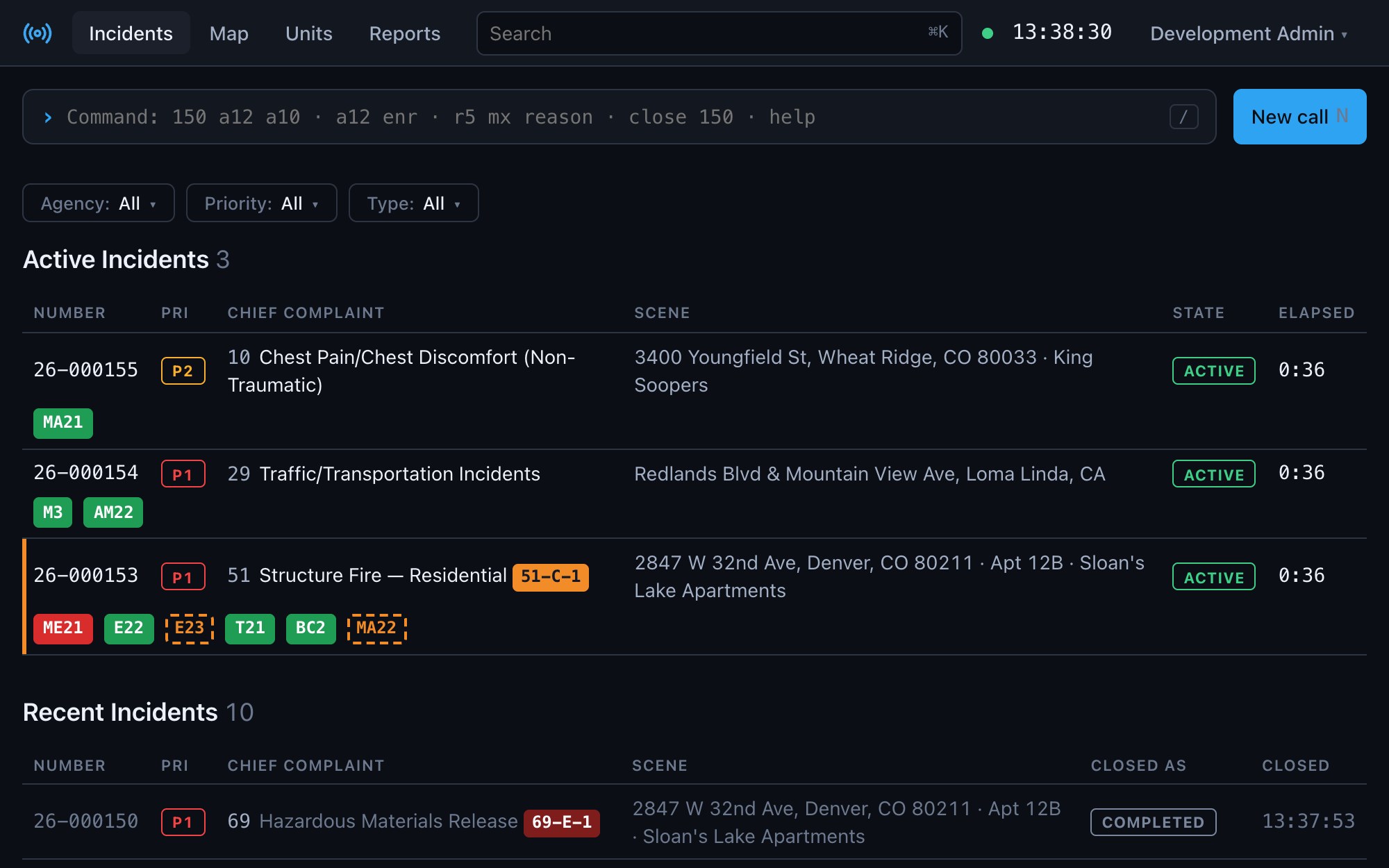
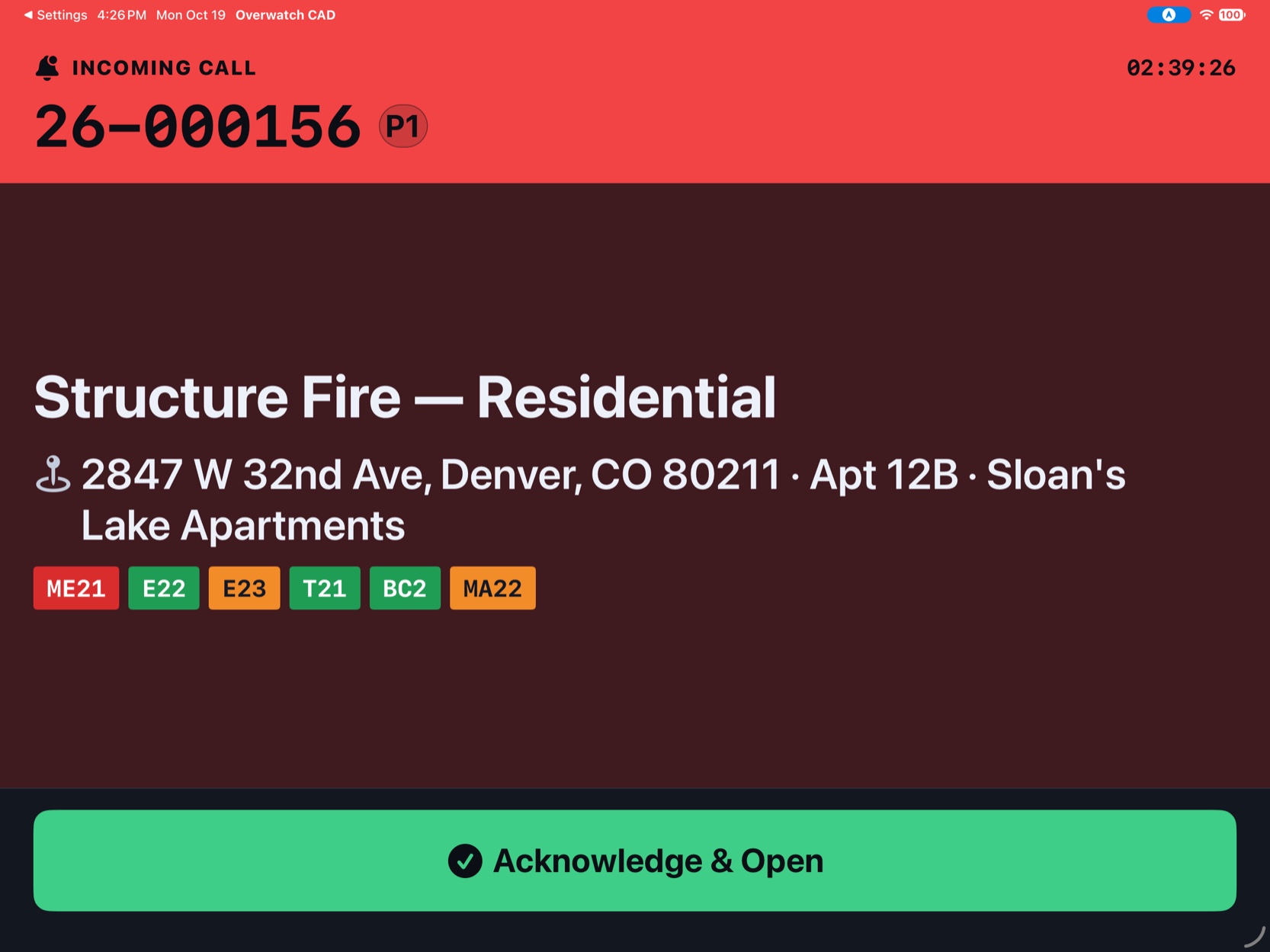
Screens from a demonstration center with sample calls. They follow the page: Day shows the day look, Night the night look.
For the dispatch center
The console
A web console for call-takers and dispatchers, built to be worked from the keyboard.
- Scene
An address, a business, or a corner
Searched on the map as you type. Cross streets typed the way they are said, a business by its name, an apartment or space beside it.
- EMD
Guided questions, a response planned
Sixty-nine cards, 1 to 9 to answer, the determinant recommended — and what the card asks for, filled or named as missing.
- Knows
What you already know about the address
Write down the hostile family or the gate code once. Every later call there carries it, without anyone remembering.
- Command
A command line for fast hands
"150 me21" assigns and pages. "me21 ipo e22" relieves one unit with another. N, I, M and U jump between pages.
For the crew
The iPad
Mounted in the cab, read from the seats, signed in to its unit for the shift.
- Page
Pages through a locked screen, even on mute
A critical alert at full volume, through mute, Focus and Do Not Disturb. The crew's chosen tone until someone acknowledges, and again each minute an engine sits at DISP.
- Where
The address, big, then what the place is called
Read at arm's length, with the apartment beside it and the call's command and tac channels on the head.
- Status
Times in one tap
Only the steps that make sense next. Reported with the link down, sent when it returns.
- TR
Transporting, and changing course
The destination, the code and the patient count at TR — changed en route, and corrected afterwards from either side.
One call, start to finish
How it works
A residential structure fire, as dispatch and the crew of Medic Engine 21 each see it.
-
17:15:02
CALL
Dispatch
The call is taken
New call: Fire, the address found on the map and the apartment typed beside it, card 51 Structure Fire — Residential. The note the center keeps about this address — gate code 4412 — goes onto the call by itself.
Crew
Nothing yet
The iPad shows the Incidents board; the new call appears on it the moment it is created.
-
17:15:40
DISP
Dispatch
Guided EMD, then the card's response
The call-taker answers the card's questions; the determinant goes on the call. Card 51 asks for three engines, a ladder, a chief and an ALS ambulance — assigned and paged in one line, on 2-CMD-1 with two tac channels.
Crew
The page
The iPad takes the whole screen with the call's number, complaint, address and units, and sounds until someone taps Acknowledge & Open.
-
17:16:31
ER
Dispatch
The unit moves on its own
ME21 turns green on the board. Until it went ER, it was re-paged every minute.
Crew
One tap
The officer taps ER on the status button. The map shows the scene; a tap on the address opens directions in Apple Maps.
-
17:21:05
OS
Dispatch
Notes, both ways
"Utilities not secured — gas meter on the alpha side." A note that starts with !! reads red and sounds an alarm in every cab on the call. Every 25 minutes the console asks for a safety check on the unit on scene.
Crew
On scene
OS with one tap, and notes added from the iPad: "Second floor, smoke showing from the eaves."
-
17:58:12
AOR
Dispatch
The call closes itself
When the last unit goes AOR, the call closes. Every time is on its printable record, in the reports, and in the NEMSIS feed your ePCR reads.
Crew
Available, then home
AOR on the radio, and AIQ back at Station 21 — where the unit is between calls, not a time the call keeps. The iPad is ready for the next page.
One record
The same notes, line for line, everywhere
Every call keeps one numbered log. Line 12 is line 12 on the console and on every iPad. Status times sit on their own tab, so the notes stay readable.
Some lines write themselves: what the center knows about the address, a turndown nearby, a re-page that went unanswered. They read like any other note, because that is where people look.
- 0917:21:44DA01UTILITIES NOT SECURED — GAS METER ON THE ALPHA SIDE
- 0817:20:12CREWME21Second floor, smoke showing from the eaves
- 0517:16:40DA01EMD 51-C-1 (Charlie) Smoke showing, building evacuating
- 0317:15:02DA01CMD: 2-CMD-1 · TAC: 2-TAC-1; 2-TAC-2
- 0217:15:02SYSGATE CODE 4412 — STANDPIPE IN THE NORTH STAIRWELL
- 0117:15:02DA01Call Created
Everything in the box
One price, nothing held back for a tier above. This is the whole product, not a roadmap.
Cross streets and business names
A corner typed the way it is said, a place by its sign, an apartment or space beside the number.
Notes kept about an address
What a crew learned there, on every later call, without anyone remembering.
69 guided EMD cards
33 medical and 32 fire, answered 1 to 9, with the determinant recommended and your own wording if you want it.
Response plans
What each card asks for, who is closest that fits, and what is still missing.
Automatic re-pages
A unit that has not answered is paged again every minute, and the record shows it went.
Command and tac channels
As many as the incident needs, from your own list, one channel to one incident.
Staging for law enforcement
Every iPad acknowledges; the scene is cleared for all of them at once.
Safety checks
Every 25 minutes for a unit on scene, asked for by name.
Shared turndowns
A declined call warns the next one taken within 25 NM for three hours.
Live unit positions
From the iPads, on every map, and in a window for a second screen.
Transport details
Destination, code and patient count — set by either side and corrected by either side.
Previous incidents
Earlier calls at the same address, a tap away on both sides.
One numbered record
The same line numbers everywhere, printable, with flagged and urgent notes that reach the cab.
Reports
Medical and fire apart, response times at the median and 90th, exported to Excel.
Roster workbook
Your whole center out to one spreadsheet and back in again.
Works through dead spots
The iPad keeps reporting; times and notes go when the link returns.
Connects to
Apple Maps
Address search when the call is taken, live unit positions, directions from the cab.
Built inNEMSIS v3.4 CAD feed
Each unit's response as a CAD record for your ePCR, ImageTrend among them.
Built inActive911
Dispatches and urgent notes paged to each unit by Cadpage email.
Built inRapidSOS
A 911 caller's device location and additional data, into the call.
PlannedMonthly, no long contract
Pricing
Pay for the dispatch center and for each iPad in a unit. Everything is included: the console, the app, maps, guided EMD, reports and the integrations above.
- The dispatch console for every dispatcher
- Your roster of units, stations and hospitals
- Reports, printable call records, NEMSIS feed
- One iPad, signed in to one unit at a time
- Paging through a locked screen, and through mute with critical alerts
- Status times, notes, the map and directions
Sign up in a few minutes; we review every center and reply within one business day. Pay by card or by invoice, monthly or yearly.
Fire departments
Engines, trucks, squads and chiefs, with fire protocols and stations as you name them.
EMS agencies
ALS and BLS ambulances, interfacility transfers, medical EMD and destinations.
Air medical programs
Helicopters and fixed wing with flight acceptance, turndowns shared by distance, and transports.
See it with your units
Request a demo
Tell us about your center and we will set up a demonstration with your own stations and units, and an iPad to try in a cab.
We answer within one business day.